Six steps to see one change.

The usual FiveM loop, every time you touch a file.

  1. 1 Edit the file VS Code
  2. 2 Switch to the server console FXServer
  3. 3 Type ensure inventory FXServer
  4. 4 Alt-tab into the game FiveM
  5. 5 Open F8 and find the error FiveM
  6. 6 Go back and look for the line VS Code

Ctrl S restarts only that resource.

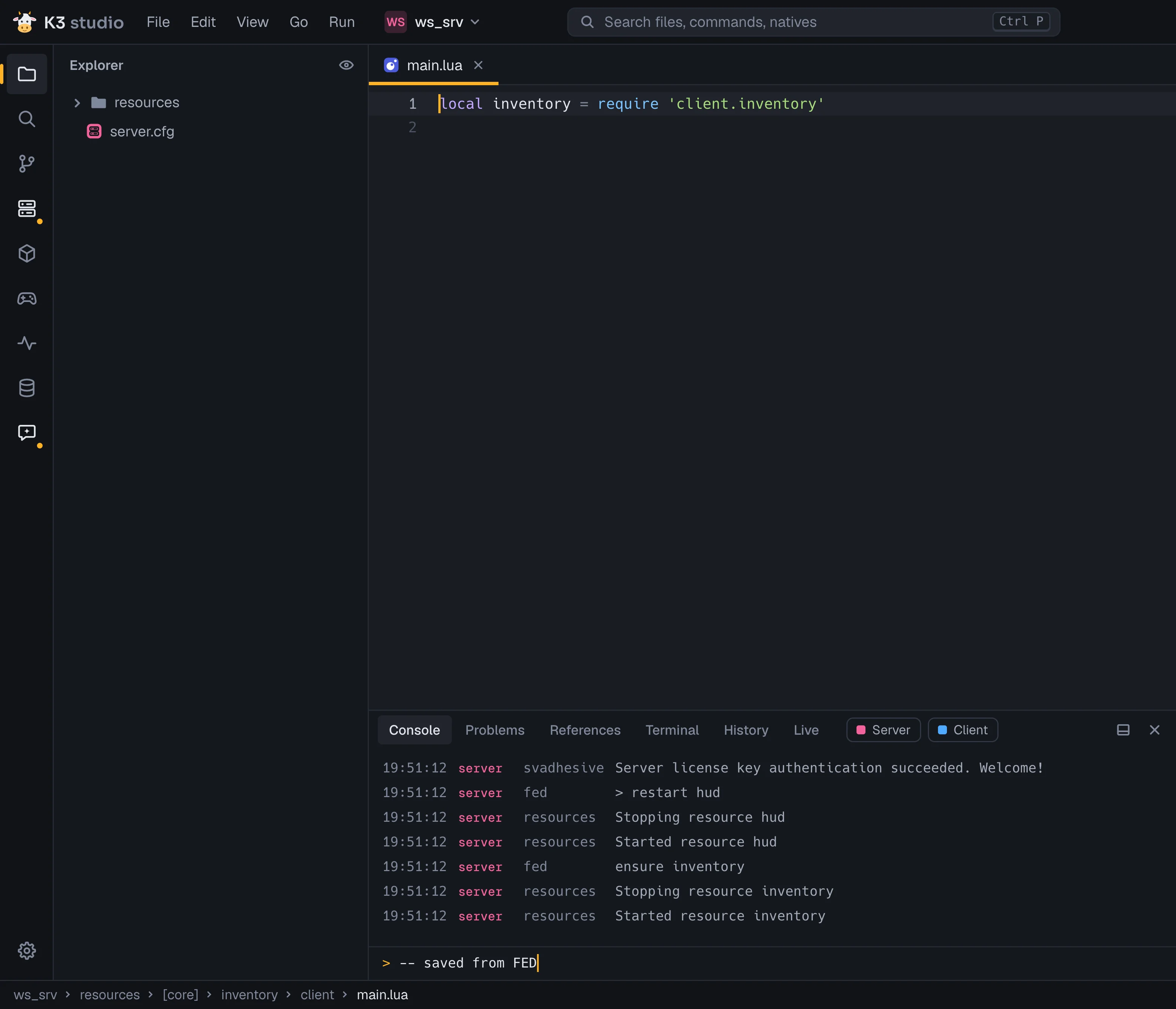
K3 Studio runs FXServer itself. Saving client/main.lua sends ensure inventory and nothing else reloads. The console shows server and client output together.

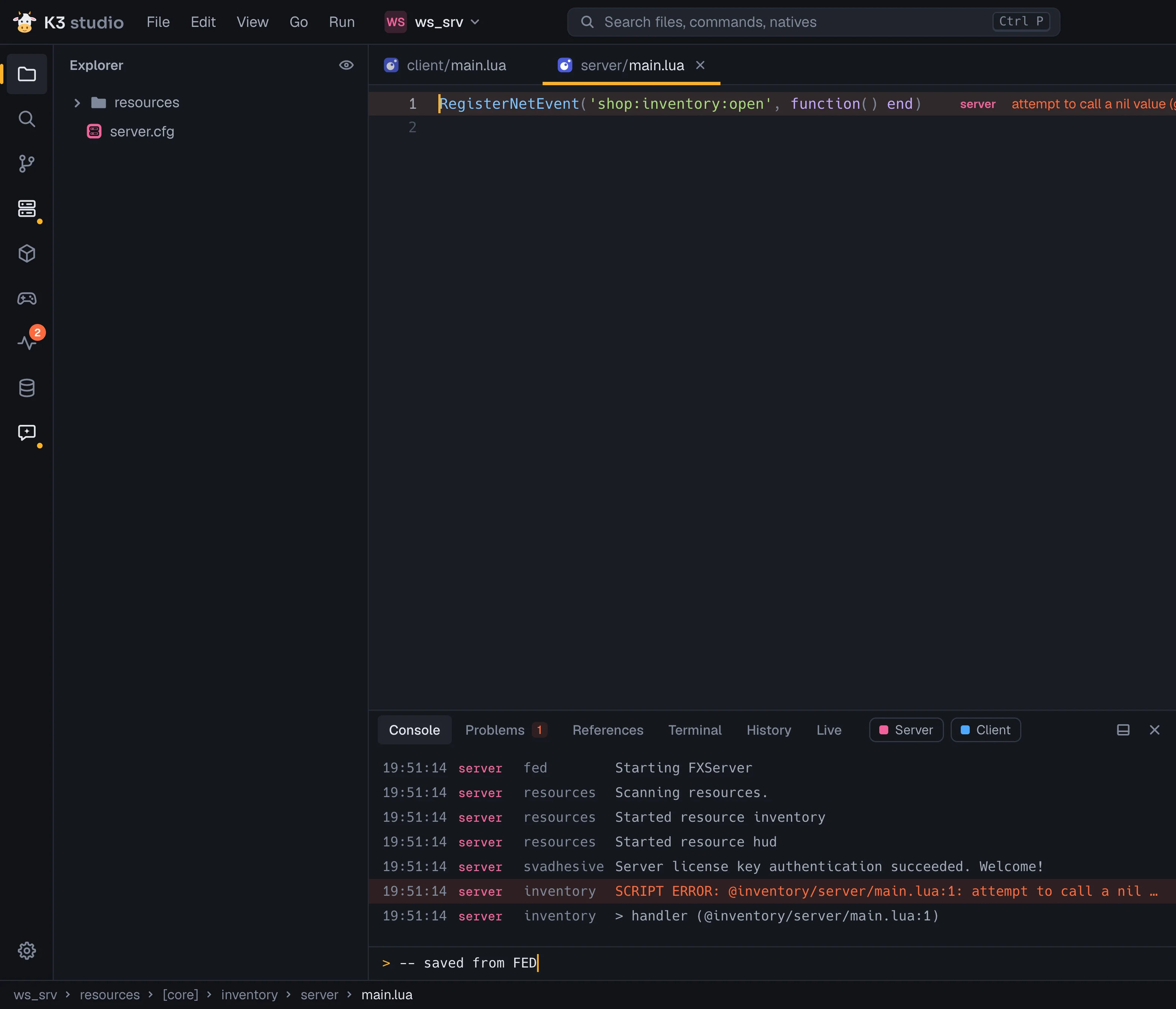
If it throws, the error lands on the line.

  1. 1 The SCRIPT ERROR line and its stack, in the console. Click it to jump to the same spot.
  2. 2 After the code: the side, the message, how many times and how long ago.
  3. 3 The Live rail item shows a badge with the error count.
A SCRIPT ERROR on line 1 of server/main.lua: the lens after the code, the red console line with its stack frame, and a badge on the Live rail item 123

How it works

  • It starts FXServer

    Start, stop and restart from the title bar pill or the Run menu, directly or through txAdmin. Restart on crash gives up after 3 crashes in 2 minutes.

    Read more
  • It writes fed-bridge

    A dev-only resource added to the server it starts. It reports through console lines, server stdout and the client log, so nothing listens on the network.

    Read more
  • One console for both sides

    Server and client output together, colored by side, with Server and Client filters, a command input with history, and clickable file:line links.

    Read more

See what your handlers do while you play.

Above every event handler, command and export, the live lens counts how many times it fired, when it last fired, which side called it and how long it took on average.

  • Turn it on per resource from the Run menu.
  • ox_lib callbacks get a lens too.
  • Each CreateThread loop shows what it costs per second and per tick, amber past 2 ms/s.
avg 0.4 ms average time per call
from client the side that called it
last 0s ago when it last ran
fired 18× how many times it ran

The Game panel talks to the running game.

It goes through fed-bridge, a dev-only resource K3 Studio writes into the server it starts. The bridge answers in console lines, so nothing listens on the network.

Run Lua in the game

F6 runs the open file, or just its selection, in your game. Shift+F6 runs it on the server. The value or the error shows in the Console.

-- Runs in your game with F6 (Shift+F6: on the server); a selection runs alone.
return GetEntityCoords(PlayerPedId())
F6 in the game ShiftF6 on the server

game> return GetEntityCoords(PlayerPedId())

game = vector3(-1037.2, -2737.6, 20.2)

server> return #GetPlayers()

server = 1
Watch values and state bags

Lua expressions re-evaluated every second, in the game or on the server. Next to them, the state bags: global, each player’s and the inspected entity’s.

  • game GetEntityHealth(PlayerPedId()) 200
  • game GetEntitySpeed(GetVehiclePedIsIn(PlayerPedId())) * 3.6 0143352718698107
  • server #GetPlayers() 1
  • server GetResourceState('inventory') "started"

GlobalState

weather = "EXTRASUNNY"

Player(1).state

job = "police"onDuty = true

Entity(34).state

fuel = 62.0

Inspect what you aim at

Aim and press Left Alt in game, or Inspect aim in the panel.

model
sultan
hash
0x39DA2754
net ID
34
owner script
vehicleshop
state bag
fuel = 62.0, locked = true

Playtests

Lua files in a resource’s playtests/ folder. An error or a failed assert fails one, with its message and line.

  • open_shop.lua game running PASS
  • buy_item.lua server running PASS
  • pay_with_card.lua game running FAIL pay_with_card.lua:6: assertion failed!

Again on every save, and before a commit (a failing one holds it).

Tune a car while you drive it.

The Game rail’s Handling tab lists every vehicle in your workspace’s handling.meta files. Switch on Live tuning and each change goes to the car you’re sitting in as you drag, until it respawns. Save keeps it.

About ten sliders in plain words
Top speed, grip, brakes, weight, ride height. Each shows its CHandlingData field, a tick at the stock value and its own reset.
Presets you stack and undo
FasterMore gripDriftHeavyArcadeRealisticPolice pursuit
Flags as switches
Handling and model flags are toggles. K3 Studio writes the hex value for you.
Test drive, then Save
A 60 s test drive measures 0 to 100 km/h, top speed, braking from 100 and cornering. Save writes handling.meta and adds the HANDLING_FILE manifest entries if they’re missing.

It reads FiveM, not just Lua.

Natives are amber. Calling a native on the wrong side, triggering an event the other side never registers, or calling an export a resource doesn't have is flagged while you type.

client/shop.lua client
1 RegisterNetEvent('shop:bought', function(item)
2 local ped = PlayerPedId()
3 local pos = GetEntityCoords(ped)
4 DropPlayer(source, 'cheater')
DropPlayer is a server-only native; this file runs on the client
5 TriggerServerEvent('shop:refund', item)
Only client scripts handle `shop:refund`, but this sends it to the server: nothing there receives it.
6 local stock = exports.inventory:GetStok(item)
inventory doesn't export `GetStok` (it exports AddItem, GetItem, GetStock): FiveM fails this call with "No such export".
7 end)

PlayerPedId and GetEntityCoords are natives, so they are amber. K3 Studio knows all 5,195 and which side each one runs on.

  1. error A native on the wrong side DropPlayer only exists on the server. In a client file it is an error before the game ever runs it.
  2. warning An event nobody receives Only client scripts register shop:refund, so sending it to the server goes nowhere. Event names complete from an index of the whole server.
  3. warning An export that isn't there inventory exports AddItem, GetItem and GetStock. GetStok would fail in game with "No such export".

One language server for each kind of file.

Completion, hover, signature help, inlay hints and diagnostics come from real language servers over LSP. The web ones are installed once with bun and pinned to fixed versions.

Lua
qbx-lua-ls
JavaScript, TypeScript
typescript-language-server
CSS, SCSS, LESS, HTML, JSON
vscode-langservers-extracted
Svelte
svelte-language-server
  • Ctrl+SpaceCompletion
  • F12Go to definition
  • Shift+F12References
  • F2Rename
  • Shift+Alt+FFormat
GetPlayerPing is a server native, so it's flagged in inventory/client. The grey name: is an inlay hint, and Shift+F12 filled the References tab.

server.cfg opens as a form.

As text it's checked while you type: a repeated ensure, an exec file that doesn't exist, a resource that isn't there. Switch to Form at the top right and the same file is sorted into sections.

  • Identity, with a live preview of ^ colours in the server name
  • Players and game: slots, OneSync, game build, ScriptHook
  • Security settings, each with a short explanation
  • Start order: move ensure lines, warned about missing dependencies

So does fxmanifest.lua.

Scripts are grouped by where they run: shared, client, server. A file that doesn't exist is flagged not found. Edits are made in place, so your comments stay.

  • Sides come from the manifest and from what each file requires
  • Client modules must be in files {}; a banner adds a missing one in one click
  • The add field suggests what each directive takes, Tab takes the first
server.cfg
1 sv_hostname "Red City"
2 ensure inventory
3 ensure hud
4
5 ensure hud
`hud` is already ensured on line 3
6 exec nothing.cfg
`nothing.cfg` doesn't exist next to this file
7 ensure ghost_resource
No resource or [category] named `ghost_resource` in this folder
8 exec "secrets.cfg"
inventory/fxmanifest.lua
1 fx_version 'cerulean'
2 game 'gta5'
3
4 shared_script '@ox_lib/init.lua'
5 client_scripts {
6 'client/main.lua',
7 'client/ui.lua',
No file `client/ui.lua` in this resource.
8 }
9 server_script 'server/main.lua'
10
11 dependencies { 'ox_lib' }

And as text, both files complete and check themselves.

server.cfg completes commands, convars after set / setr / sets, resources and [categories] after ensure, and .cfg files after exec. It flags unknown resources, missing exec files, repeated ensures, a placeholder license key and secrets that .gitignore doesn't cover.
fxmanifest.lua strings complete to what their directive takes: script paths and folder globs, pages, folder/**, resource names for dependencies, and @ox_lib/init.lua.

NUI pages are checked against FiveM's Chrome 103.

Vite lowers syntax to its build target but adds no polyfills, so a newer CSS feature or API works in your desktop browser and breaks in game. K3 Studio warns in NUI files, and about a vite config with no build target.

hud/web/src/app.css
1 .list:has(.item.active) {
:has() needs Chrome 105; FiveM's in-game browser is Chrome 103
2 height: 100dvh;
dynamic viewport units needs Chrome 108; FiveM's in-game browser is Chrome 103
3 background: color-mix(in srgb, red, blue);
color-mix() needs Chrome 111; FiveM's in-game browser is Chrome 103
4 }
hud/web/vite.config.js
1 export default defineConfig({ plugins: [svelte()] })
No build target: set build: { target: 'chrome103' } so Vite lowers syntax FiveM's in-game browser can't run
The In-game UI card switches ui_page between your dev server and the build, and updates files {} to match.

Claude Code, inside the editor.

K3 Studio runs the claude CLI in a panel and gives it an MCP server, so the agent can see your server, fix what broke, and test the fix in the game.

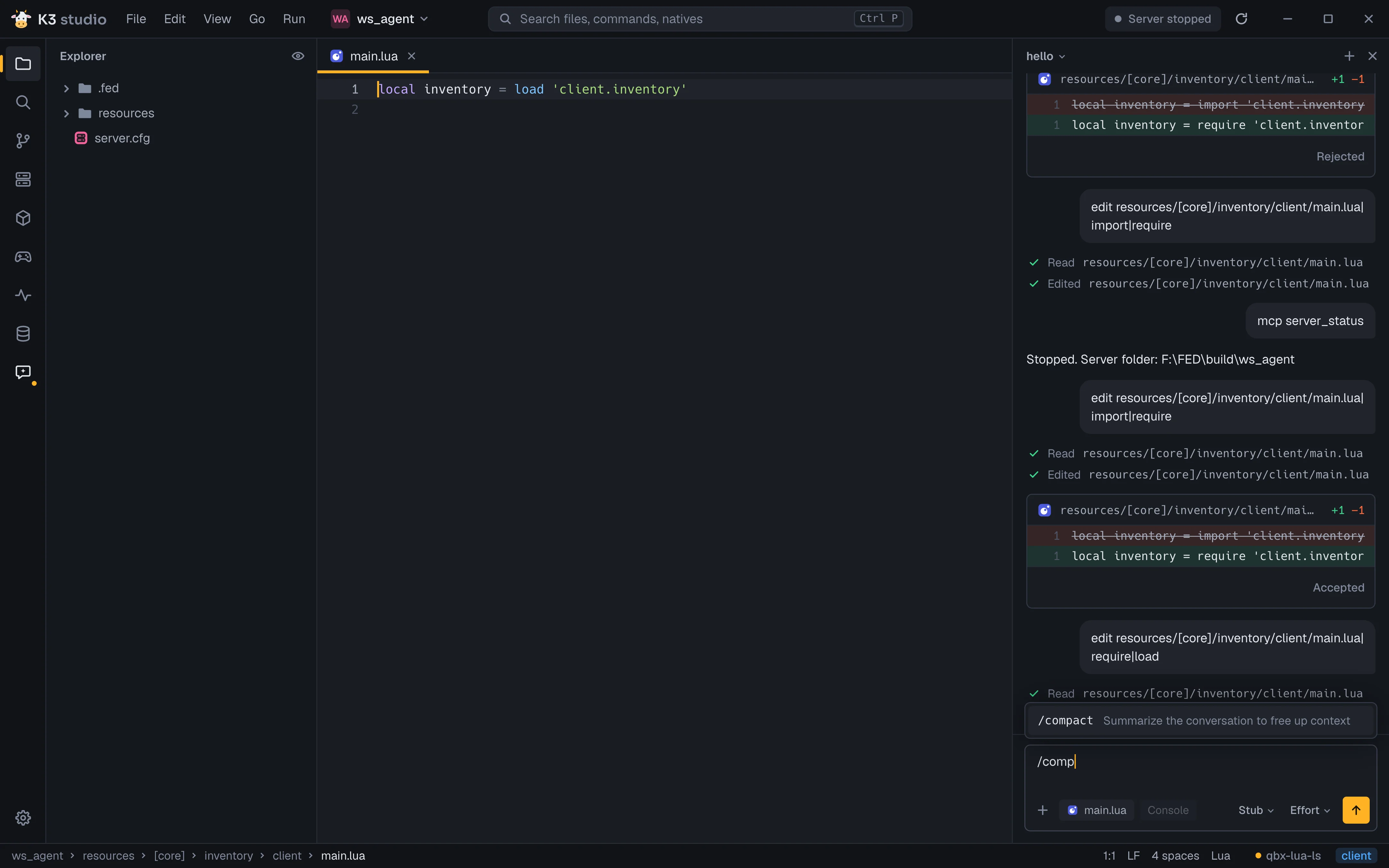
Ctrl+L opens the agent.

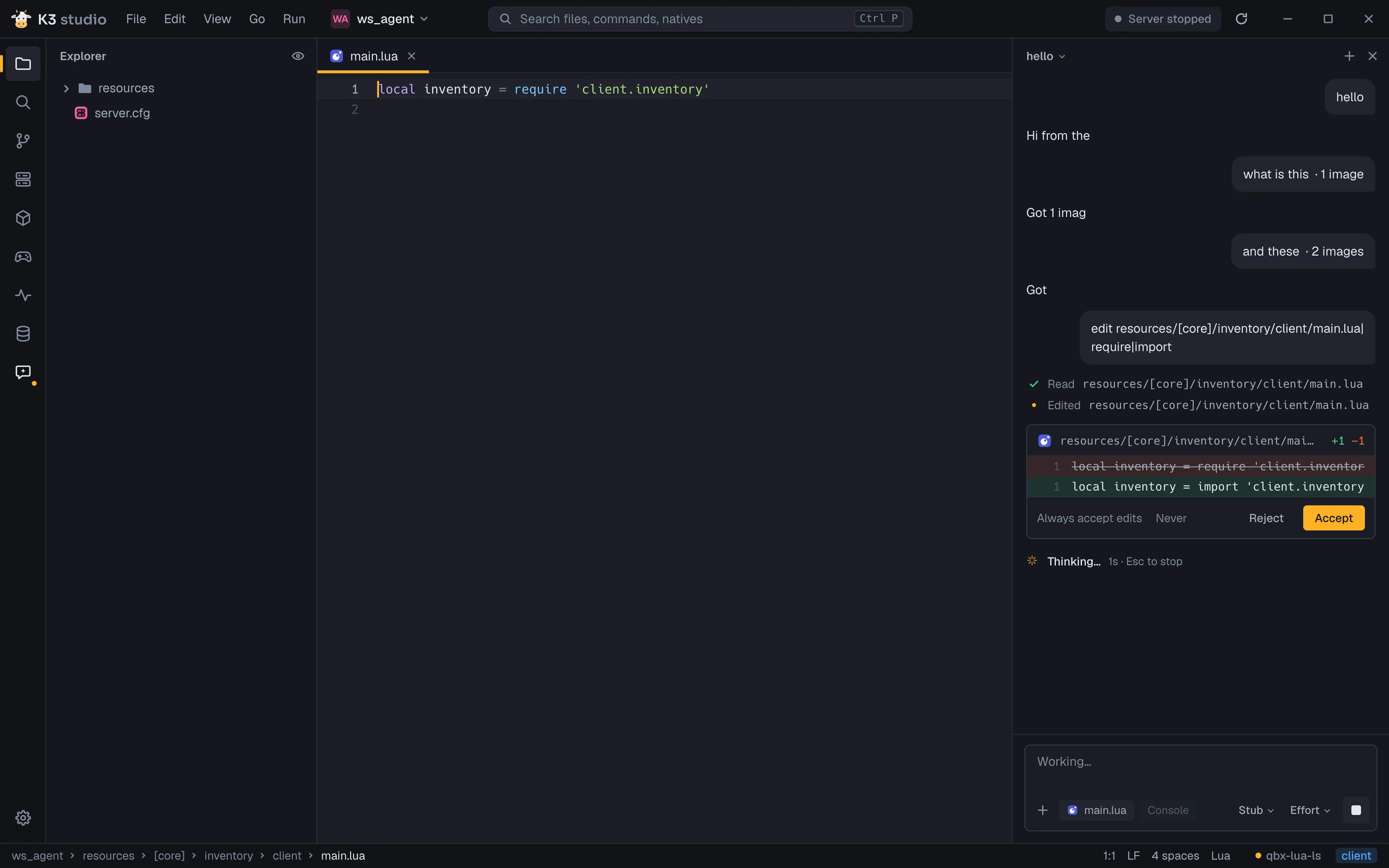
Claude Code runs in a panel beside your code and shows each step as it happens: Read, Edited. Sessions sit in the header; switch to one and resume it.

Every edit is a hunk.

Accept it or Reject it, or turn on Always accept edits. When the agent wants a tool, a card asks: Ask each time, or Always allow for the session.

Your context comes along.

The open file and the console ride along as chips, and you can attach images. The model and effort pickers switch mid-conversation and resume it. Esc stops a run.

Type / for commands and skills.

Claude Code's slash commands and your skills are suggested as you type, like /compact to free up context.

K3 Studio with the agent panel: an edit hunk with Accept and Reject The agent composer suggesting /compact after typing /comp

It tests its own change.

K3 Studio is an MCP server too. Claude Code gets tools to read the console and runtime errors, run console commands, query the database, run playtests, and play the game.

  • HTTP on 127.0.0.1, a random port, a bearer token
  • Attached to Claude Code automatically
  • Your own MCP servers still load
Agent Playing the game · Esc takes control back

Refunds in the shop don't work. Fix it and test it in game.

  1. runtime_errors() shop/server/main.lua:42 nil value Reads the SCRIPT ERRORs the consoles caught, with file, line, count and stack.
  2. db_query('DESCRIBE shop_orders') id, item, refunded Runs read-only SQL on your database. db_execute changes data, and asks you first.
  3. Edit(shop/server/main.lua) accepted The fix arrives in the panel as a hunk, and you accept it.
  4. server_command('ensure shop') Started resource shop Runs a command in the FXServer console: here, restart the resource.
  5. game_teleport(25.7, -1347.3, 29.5) ok Moves the player next to the shop. The agent has the controls now; Esc takes them back.
  6. game_walk_to(29.1, -1345.0, 29.5) walking Walks in along the navmesh like a player would, so the shop's zone triggers.
  7. game_press('INPUT_PICKUP') held 100 ms Holds a game control down, as if the player pressed E.
  8. game_wait_for('LocalPlayer.state.refunded') true Re-checks a Lua condition in the game every 100 ms until it holds.
  9. playtests_run('shop') PASS Runs the resource's playtests and reports PASS or FAIL with the failing line.
  10. runtime_errors() none Checks that the restart left no new errors behind.

Fixed and tested in game: the refund works, the playtest passes, no script errors.

All 18 tools

MCP reference

Everything else your server needs, in the same window.

Git, the database, search, a terminal, resource tools and the stream asset editors. Pick an area to see what it does and the keys that drive it.

Commit, read history and undo without a second app

  • Side-by-side diff with Stage, Amend, and Write to let the agent write the commit message.
  • An Undo bar after commit, stage, unstage, discard, revert and amend. Ctrl+Z works while the commit is still the tip; discards are kept in a stash.
  • History with refs and avatars, Copy hash and Revert, Branches and Stash tabs, and a branch picker in the title bar.
  • Inline blame on the caret line. Before a commit the license key, Steam API key, Tebex secret and MySQL password are caught and can move to secrets.cfg.
Git docs

Native, so it stays out of your way.

Written in Odin with SDL3 and OpenGL. It draws every pixel itself, with no browser engine inside.

1 draw call The whole window is one OpenGL draw: SDF rounded rects for every panel and button.
Glyph atlas Text is drawn from its own glyph atlas, with kerning, in that same draw.
Rope buffer Files are held in a rope, so typing in a long file never copies the whole thing.
~0% CPU It only redraws when something changes. Sitting still costs nothing.
How frames are spent: one is drawn for a keypress, a save or a finished git status, and none in between. Git runs on worker threads, so the UI never waits on it.

Two ways in.

Windows 10 or 11. Optional: bun for the web language servers, git, and the claude CLI for the agent.

Installer

  • Installs for your user only, no admin.
  • Adds Open with K3 Studio to the right-click menu of files and folders.
  • Puts k3studio on your PATH, so k3studio . opens the current folder.
  • Checks GitHub at startup, downloads the new version in the background and installs it when you quit.
Download

From source

# Odin nightly dev-2026-10 on PATH, MSVC once
git clone https://github.com/Kr3mu/k3studio
cd k3studio
./run.sh          # debug build, then runs it
./run.sh release  # optimized build
./run.sh test     # unit and UI tests

MSVC builds tree_sitter.lib and nanosvg.lib once. Builds from source report dev and never update.

Build guide

First run takes four steps.

Skip any of it; everything stays in Settings.

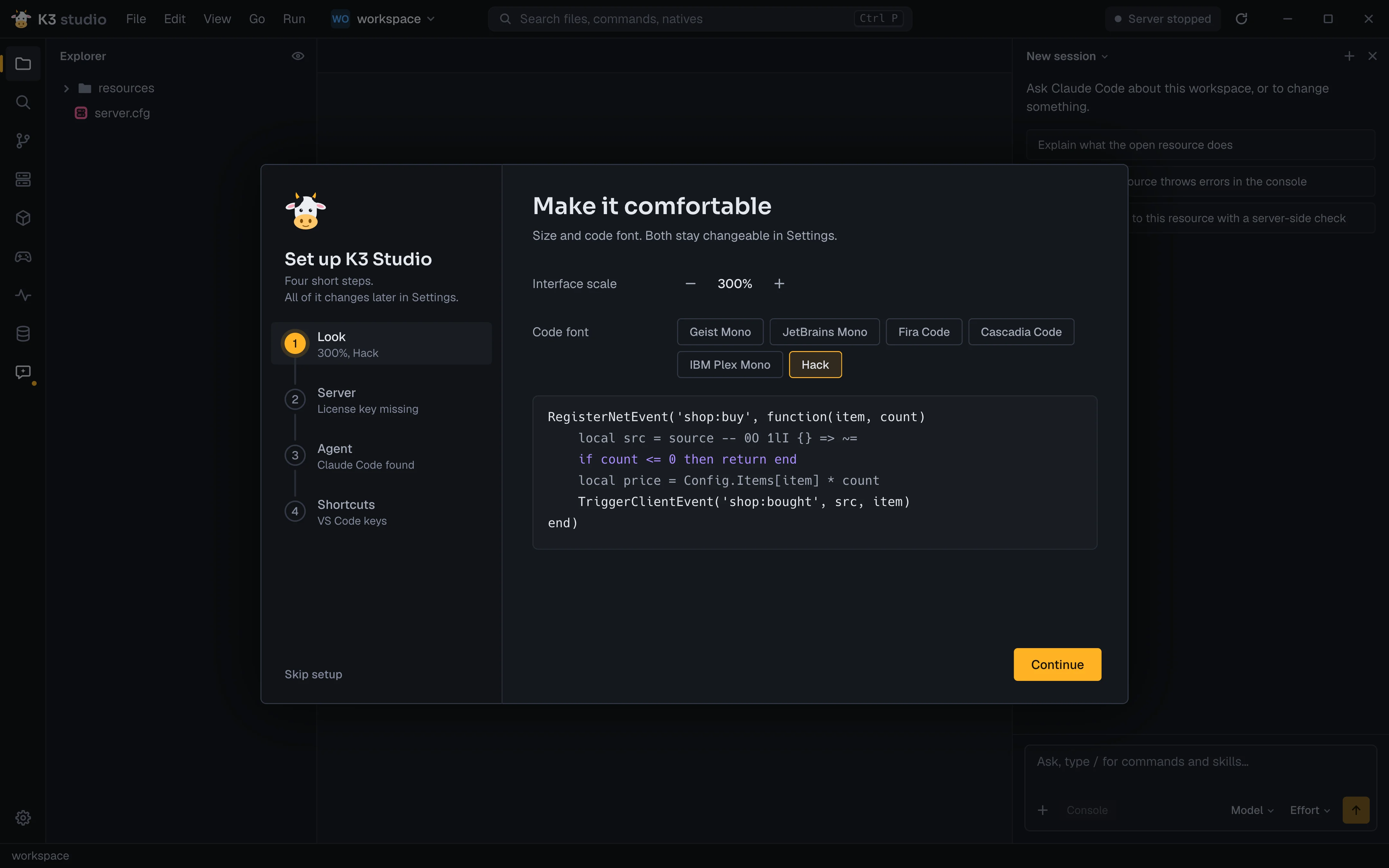
  1. 1
    Look

    Interface scale and code font, with a preview of real Lua.

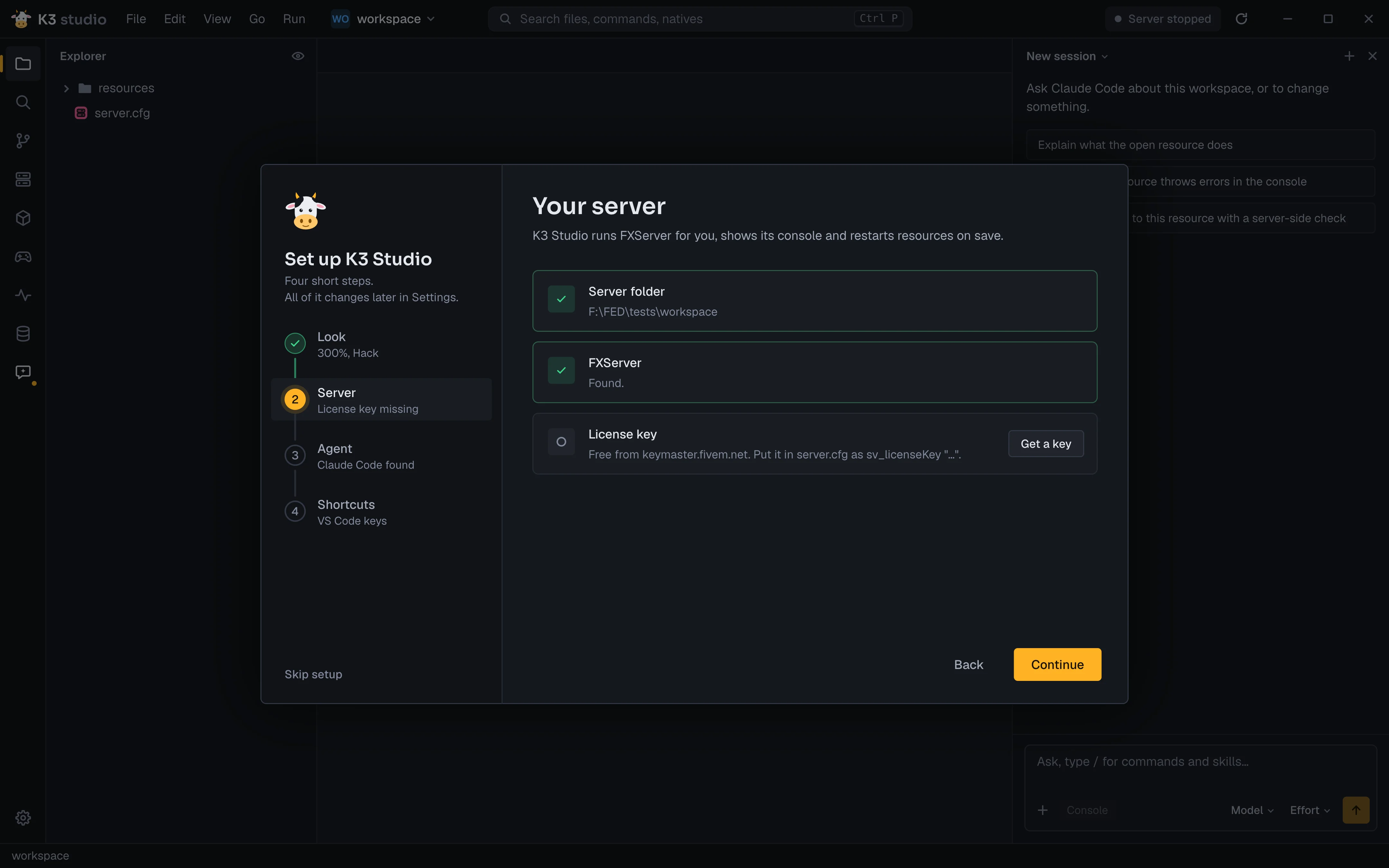
  2. 2
    Server

    Server folder, FXServer and the license key, free from keymaster.fivem.net.

  3. 3
    Agent

    Finds Claude Code. It works with you in the panel on the right.

  4. 4
    Shortcuts

    The VS Code keys. Rebind any of them in Settings, Keybindings.

Setup, step Look: interface scale 200% and the Hack code font with a Lua preview Setup, step Server: server folder and FXServer found, license key missing

Then: what do you want to make?

With no folder open, K3 Studio starts on its creators and editors for the game's streamed assets, with your recent folders beside them. Pick one, or open your server folder.

Shells, interiors & maps

  • Shell creator
  • Interior (MLO) editor
  • New interior
  • Map editor
  • New map

Textures

  • Texture dictionary
  • New texture dictionary
  • Livery

Props, peds & clothing

  • Prop creator
  • Clothing
  • Add-on ped

Vehicles

  • Add-on car
  • Handling

Scripts

  • Start a new resource

Get K3 Studio for Windows.

Free and open source under GPL-3.0. The installer keeps itself up to date.

AI tools can read all of the docs as one file at /llms.txt.